
Stop Wasting Time: The Ultimate Communication Tool for Remote Teams
Remote work is no longer an experiment—it's the default for most knowledge workers. According to Gallup research, 27% of full-time employees now work fully remotely, with an additional 52% in hybrid arrangements. Distributed teams have become the norm rather than the exception.
But here's what nobody tells you: the tools we use haven't kept pace with how we actually work. A ClickUp workplace communication survey found that over 60% of a team's time is spent searching for context, information, and action items scattered across chat threads, emails, and video recordings. Miscommunication causes 28% of missed deadlines. And for global teams, language barriers add yet another layer of friction to every interaction.
The question isn't whether remote work is viable—it's whether your team has the right tools to make it efficient.
This is where SuperIntern comes in. Designed specifically for the realities of distributed, multilingual teams, it's more than just translation software for remote teams—it's a complete meeting intelligence platform that transforms how your team communicates, collaborates, and gets things done.
The Hidden Costs of Remote Team Communication
Before we dive into solutions, let's be honest about the challenges:
Communication gaps are universal. The same ClickUp survey found that 78% of managers cite communication gaps as their top challenge with remote teams. When you can't walk over to someone's desk, misunderstandings compound. Messages get buried in Slack. Important context lives in someone's head instead of in shared documentation.
Time zones fragment your team. Research published in Organizational Science by Prithwiraj Choudhury, studying over 12,000 employees at a multinational corporation, found that synchronous communication drops by 11% for every hour of time difference between team members. This means a team spanning São Paulo, London, and Singapore has dramatically fewer opportunities for real-time alignment—and when those opportunities arise, someone is always attending at an inconvenient hour.
Language barriers multiply everything. For global teams, add translation challenges to every interaction. A quick sync becomes a 45-minute call. Technical discussions require constant clarification. Nuance and tone get lost, leading to relationship friction that takes months to repair.
Meeting fatigue is real—but meetings are essential. Microsoft's 2023 research documented that the total time spent in meetings tripled compared to pre-pandemic levels, with remote employees now attending 50% more meetings than in-office staff. Yet meetings remain the primary way distributed teams make decisions, build relationships, and maintain alignment. The problem isn't meetings themselves; it's that we're terrible at capturing and using what happens in them.
These aren't problems that "better discipline" or "more communication training" will solve. They require better tools.
Why Most Remote Tools Fall Short
Your team probably uses Zoom or Teams for video calls. Slack or Teams chat for messaging. Google Docs or Notion for documentation. Maybe Fireflies or Otter for meeting transcription.
Each tool does its job reasonably well. But together, they create fragmentation:
- Meeting insights live in one place; action items in another. Your transcription tool captures what was said, but extracting the actual decisions and next steps requires manual effort—effort that often doesn't happen.
- Translation is an afterthought. Built-in platform translation (like Zoom's translated captions or Teams' live captions) only works within that platform. Switch to a different video tool, and you're back to struggling.
- Context is scattered. Information from your 10 AM call with the product team has no connection to your 2 PM client meeting, even when they're discussing the same project. The ClickUp survey found that 92% of knowledge workers are at risk of losing important decisions due to scattered documentation.
- Bots everywhere. Most AI tools require adding a bot to your meeting. For internal calls, that's fine. For client meetings, negotiations, or sensitive 1-on-1s, it changes the dynamic. People speak differently when they see "AI Notetaker" in the participant list.
The result: remote work that feels like constant catching up instead of moving forward.
SuperIntern: Built for How Remote Teams Actually Work
SuperIntern takes a fundamentally different approach. Instead of bolting translation and transcription onto existing tools, it's designed from the ground up for the realities of distributed, multilingual work.
Feature 1: Real-Time Translation Across 50+ Languages
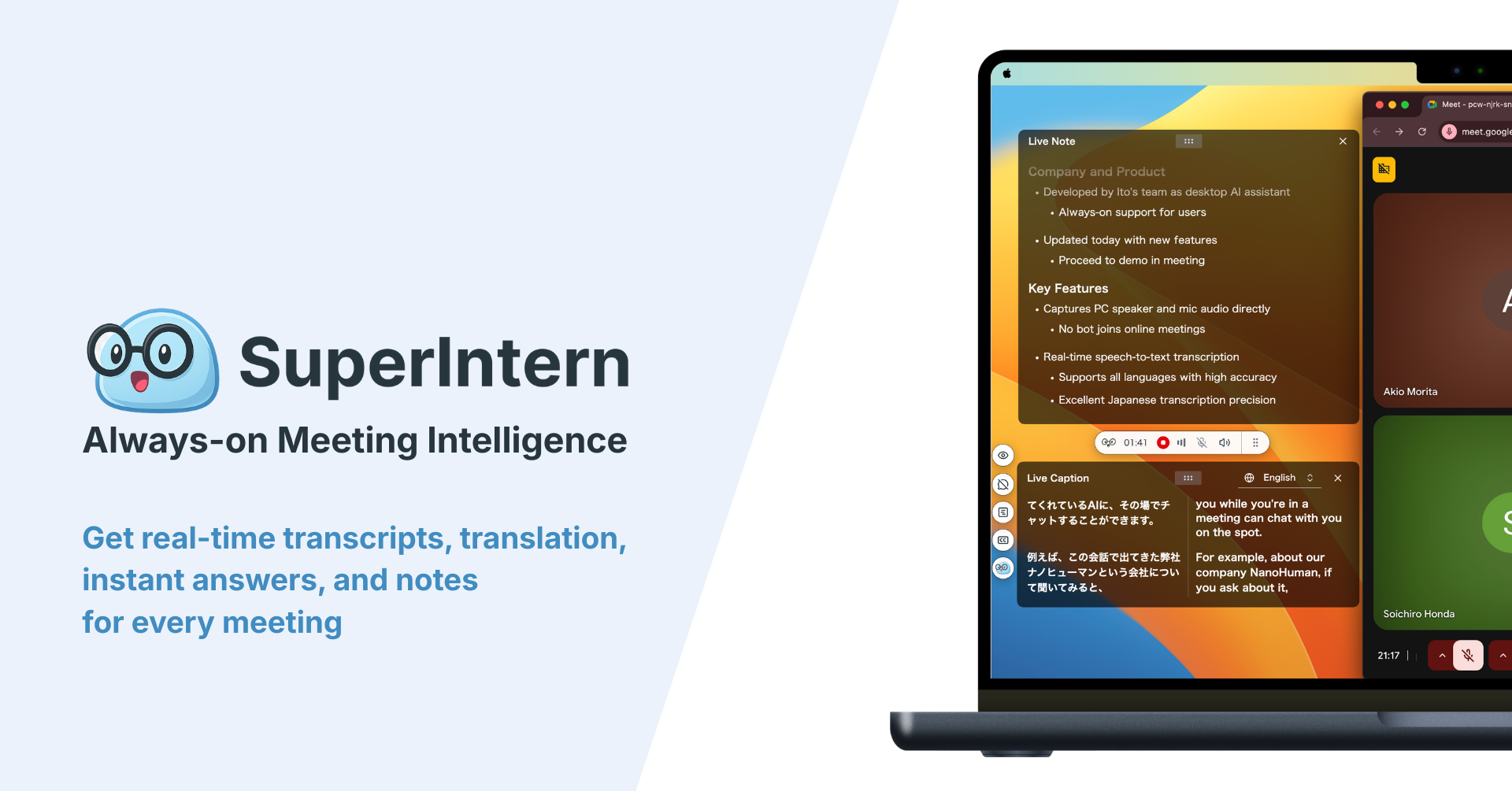
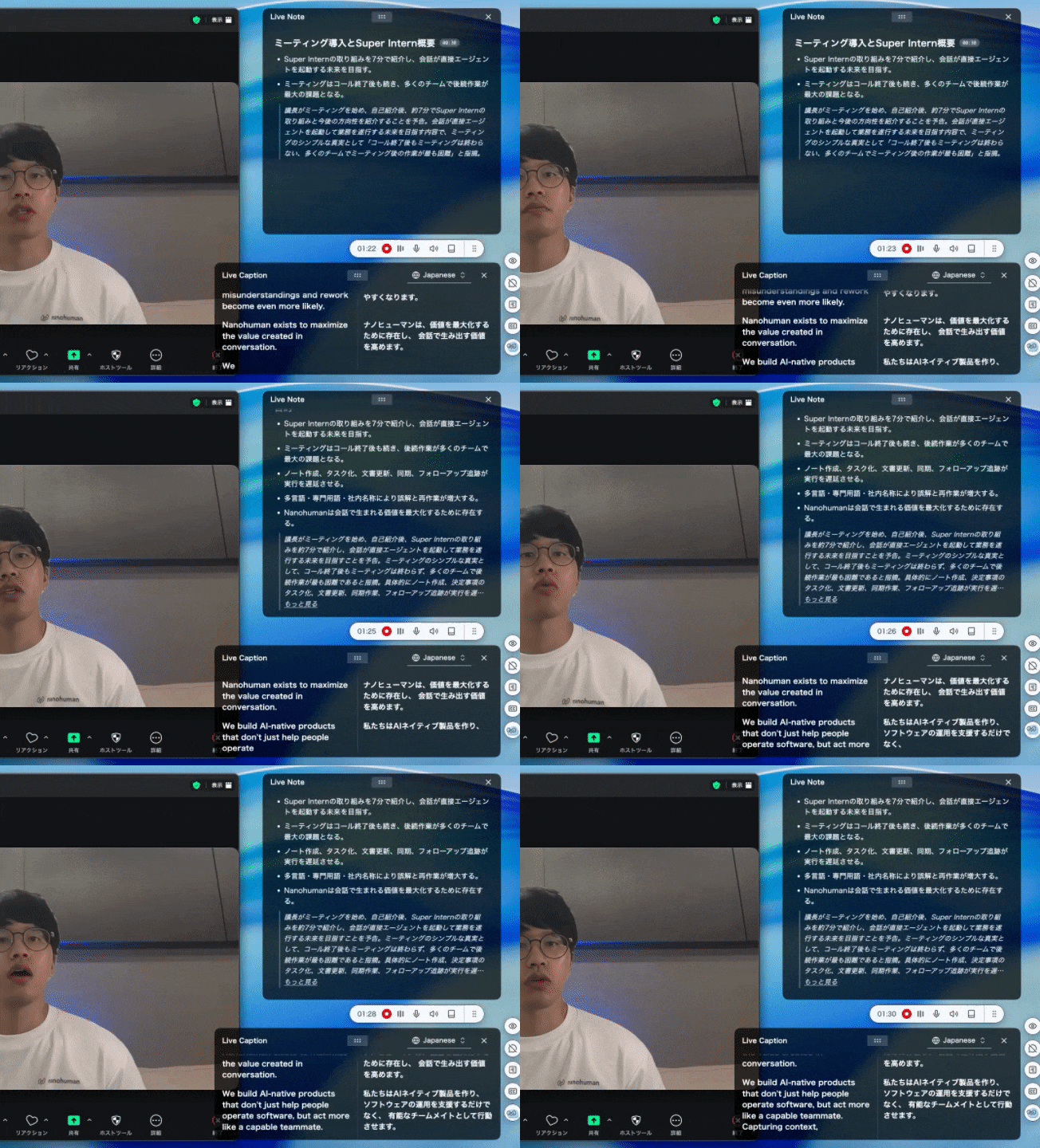
Language shouldn't be a barrier to collaboration. SuperIntern translates speech in real time with exceptional accuracy—significantly higher than other tools we've tested—across more than 50 languages.
How it helps remote teams:
- Join any meeting with confidence. Whether your German engineering team is presenting to US stakeholders, or your Brazilian sales team is meeting a Singapore prospect, everyone can follow along in their preferred language.
- Separate language settings for subtitles and summaries. Need to follow the conversation in both English and Spanish during the call, but want your summary in English only? SuperIntern handles this automatically.
- Custom dictionary for your terminology. Every company has its own vocabulary—product names, internal acronyms, partner companies. SuperIntern's custom dictionary ensures these terms are translated correctly, not garbled into something unrecognizable.
For remote teams operating across language boundaries, this isn't a nice-to-have—it's the difference between productive collaboration and constant friction.
Feature 2: Platform-Agnostic—Works Everywhere You Meet
Most translation tools are locked to a single platform. Zoom's translated captions only work in Zoom. Teams' live captions only work in Teams. If your client prefers a different platform, you're out of luck.
SuperIntern works differently. It captures audio directly from your Mac's speakers and microphone, meaning it works with any meeting tool:
- Zoom
- Microsoft Teams
- Google Meet
- Webex
- Slack Huddles
- Even in-person meetings (just enable microphone capture)
Why this matters for remote teams:
You can't control which tools your clients, partners, or external stakeholders use. One meeting might be on Zoom; the next on Teams; the third on Meet. SuperIntern gives you the same translation and note-taking experience regardless—no context switching, no "let me check if this tool works with that platform."
Feature 3: Botless Operation—No Participant Joins Your Meeting
This is a game-changer for client-facing teams.
Most transcription and translation tools require a bot to join your meeting as a participant. You've seen them: "Fireflies.ai Notetaker" or "Otter Bot" appearing in the participant list. For internal team calls, this might be acceptable. For external meetings, it creates problems:
- Clients get suspicious. An unfamiliar "participant" joining the call breaks trust before you've even started talking.
- Confidentiality concerns. Some industries—legal, healthcare, finance—have policies against third-party recording tools in meetings.
- Self-censorship. People speak differently when they know an external service is recording.
SuperIntern runs entirely on your device. It captures audio from your computer's speakers and microphone—no bot appears in the meeting, no indication to other participants that you're using any tool at all.
The practical impact:
Use SuperIntern in client negotiations, investor calls, sensitive HR discussions, or anywhere discretion matters. The translation and notes happen invisibly on your end.
Feature 4: Real-Time Structured Notes That Update During the Meeting
Here's where SuperIntern truly differentiates itself from typical transcription tools.
Most meeting tools give you a wall of text—a transcript of everything said. Useful for searching, but terrible for action. You still have to read through it, extract the important points, and figure out what happens next.
SuperIntern generates structured notes in real time. As the conversation progresses, you see:
- Key discussion points organized by topic
- Decisions made highlighted clearly
- Action items with implied owners
- Important context that connects to your ongoing projects
These notes update continuously during the meeting, so you can glance at them to confirm you haven't missed anything critical—without diverting attention from the conversation.
For remote teams, this solves a critical problem:
When your meeting ends at 11 PM your time (because you're accommodating colleagues in a different timezone), the last thing you want is to spend another 30 minutes processing notes. With SuperIntern, the notes are ready the moment the call ends.
Feature 5: Always-On Meeting Intelligence
SuperIntern is designed to be "always on." You don't need to remember to start recording before each call, configure settings for different platforms, or decide which meetings are "worth" capturing.
What this means in practice:
- Enable it once, and it runs quietly in the background
- Every meeting gets the same consistent treatment
- No more "I forgot to record that important call"
- Build a searchable archive of every conversation over time
For remote teams who move between meetings constantly—sometimes with 5 or 6 calls in a day—this passive capture is invaluable. You never miss insights because you forgot to click a button.
How SuperIntern Addresses Core Remote Work Challenges
Let's map these features back to the challenges we discussed earlier:
Challenge: Communication Gaps (78% of managers' top concern)
SuperIntern's solution: Real-time structured notes capture decisions and context during the meeting itself. No more "I thought we agreed on X" when someone remembers Y. The notes become the shared source of truth.
Challenge: Time Zone Fragmentation
SuperIntern's solution: When someone can't attend a meeting live, they don't need to watch a 60-minute recording. The structured notes and transcript let them catch up in 5 minutes, knowing they've captured the essential points.
Challenge: Language Barriers
SuperIntern's solution: 50+ language real-time translation, plus custom dictionaries for company-specific terminology. Your team in Berlin and your team in Mexico City can collaborate as seamlessly as if they shared a native language.
Challenge: Meeting Fatigue Without Losing Information
SuperIntern's solution: Better notes mean fewer follow-up meetings. When everyone has clear documentation of what was decided and what happens next, you don't need to reconvene to "make sure we're aligned."
Challenge: Scattered Context Across Tools
SuperIntern's solution: All your meeting intelligence—translation, transcription, notes—lives in one place, searchable and organized. Stop hunting through Slack threads for that thing someone mentioned in last week's call.
Getting Started with SuperIntern
SuperIntern is currently available for Mac, with Windows support coming soon—join the waitlist here. Here's how to get started:
- Download the app from the SuperIntern website
- Complete the quick setup (takes about 1 minute)
- Start any meeting—SuperIntern captures automatically
There's no credit card required to start. The free tier lets you experience the core features before deciding if it fits your team's needs.
Who Benefits Most from SuperIntern?
While SuperIntern helps any remote team, certain use cases see particularly dramatic improvements:
Global Sales Teams
When you're selling into markets where English isn't the first language, real-time translation removes a major barrier. Your sales reps can focus on understanding the client's needs instead of struggling with language. Custom dictionaries ensure product names and pricing terms translate correctly.
Distributed Engineering Teams
Technical discussions across language boundaries are notoriously difficult. Jargon, abbreviations, and context-specific terminology trip up generic translation tools. SuperIntern's custom dictionary and business-optimized translation engine handle technical conversations far better than consumer-grade alternatives.
Leadership and Cross-Functional Teams
Executives often move between meetings with vastly different contexts—product review at 9 AM, client escalation at 10 AM, investor update at 11 AM. SuperIntern's always-on capture ensures nothing falls through the cracks, while structured notes make it easy to context-switch without losing important details.
Client Services Teams
When you're the face of your company to clients across different countries, seamless translation builds trust. Botless operation means clients never feel uncomfortable about third-party tools in sensitive conversations.
The Bottom Line: Remote Work Deserves Better Tools
Remote teams are here to stay. The question is whether we'll keep struggling with tools designed for a different era, or embrace solutions built for how distributed work actually happens.
SuperIntern addresses the core challenges: language barriers that fragment global teams, scattered context that wastes hours every week, meeting fatigue that drains energy without capturing value, and the awkwardness of bots in professional conversations.
If your team operates across multiple meeting platforms, needs real-time translation support, values discretion (no bots in client calls), and wants both translation and intelligent meeting notes in one tool—SuperIntern is worth trying.
👉 Start Your Free Trial — No Credit Card Required
Stop wasting time on miscommunication, scattered notes, and language barriers. Your remote team deserves tools that actually work for how you work.